Exploring the Versatility of Lovebook Google Slide Template
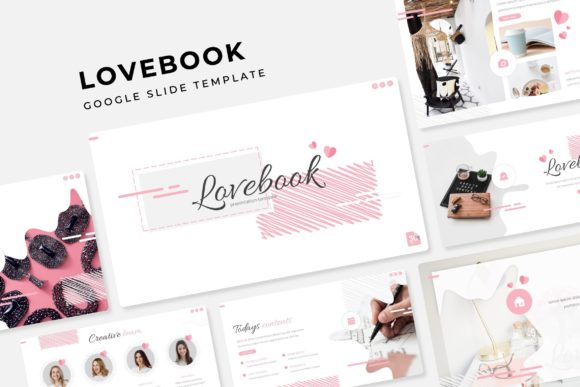
The Lovobook Google Slide Template is a comprehensive and visually appealing solution for creating engaging presentations. Designed with a focus on versatility and ease of use, this template offers a wide range of features that cater to various presentation needs. Whether you are preparing a business pitch, a creative portfolio, or an academic presentation, the Lovebook Google Slide Template provides a robust framework to help you deliver your message effectively.
Key Features of Lovebook Google Slide Template
- 150 Total Slides: The template includes 150 slides, each meticulously designed to meet different presentation requirements.
- 5 Premade Colors: Choose from five distinct color variations, each offering 30 unique slides, allowing for a cohesive and professional look.
- Handcrafted Infographics: The template features handcrafted infographics, which can be easily customized to fit your specific data and visual needs.
- Section Break Slides: Use section break slides to clearly delineate different parts of your presentation, enhancing the overall flow and structure.
- Gallery and Portfolio Slides: Showcase your work and projects with dedicated gallery and portfolio slides, perfect for creative and professional presentations.
- Resizable and Editable Graphics: All graphic elements are fully editable and resizable, making it easy to adjust them to your content and style preferences.
- Picture Placeholder: Drag-and-drop picture placeholders allow for seamless integration of images, ensuring your visuals are perfectly aligned and presented.
- Based on Master Slides: The template is built using master slides, enabling consistent and efficient updates across all slides.
- Pixel-Perfect Illustrations: Enjoy high-quality, pixel-perfect illustrations that add a professional and polished touch to your presentations.
What's Included in the Lovebook Google Slide Template
- 5 PPTX Files: The package includes five PowerPoint files, each with its own set of 30 slides, providing ample options for customization.
- 5 PPTX Widescreen Files: Additionally, there are five widescreen PowerPoint files, ideal for modern presentations that require a more expansive view.
- 5 Premade Color Variations: Each file comes with five color variations, allowing you to select the one that best matches your brand or personal style.
- Readme First Document: A detailed Readme First document is included, providing instructions and tips for using the template effectively.
- Free Font Download Link: The template uses free fonts, and a download link is provided, ensuring that you can replicate the exact look and feel of the design.
Strengths and Tradeoffs of Lovebook Google Slide Template
Strengths:
- Versatility: With 150 slides and multiple color variations, the Lovebook Google Slide Template is highly versatile, suitable for a wide range of presentation types.
- Customizability: The template's editable graphics and drag-and-drop picture placeholders make it easy to tailor the design to your specific needs.
- Professional Design: The inclusion of handcrafted infographics and pixel-perfect illustrations ensures a professional and polished appearance.
- User-Friendly: The use of master slides and clear instructions in the Readme First document makes the template accessible even for those with limited design experience.
Tradeoffs:
- Learning Curve: While the template is user-friendly, new users may need some time to familiarize themselves with the extensive features and customization options.
- Image Integration: The preview images used in the template are not included, so users will need to source their own images, which can be an additional step.
When to Use Lovebook Google Slide Template
The Lovobook Google Slide Template is an excellent choice for a variety of scenarios, including:
- Business Presentations: The professional and clean design makes it ideal for business pitches, reports, and client presentations.
- Creative Portfolios: The gallery and portfolio slides are perfect for showcasing creative work, such as photography, design, and art.
- Educational Use: The template's versatility and customizability make it suitable for academic presentations, lectures, and student projects.
- Marketing Campaigns: The handcrafted infographics and customizable graphics are particularly useful for creating visually compelling marketing materials.
When to Consider Alternatives
While the Lovobook Google Slide Template is a powerful tool, there may be situations where other options might be more suitable:
- Specialized Needs: If your presentation requires highly specialized features, such as advanced animations or interactive elements, you may need to explore more specialized templates or tools.
- Minimalist Design: For those who prefer a minimalist and straightforward design, the extensive features and options in the Lovebook template might be overwhelming. In such cases, a simpler template might be more appropriate.
- Budget Constraints: Although the Lovebook template offers great value, if budget is a significant concern, there are free or lower-cost alternatives available that may meet basic presentation needs.
Making the Right Choice
Choosing the right presentation template is crucial for delivering a successful and impactful presentation. The Lovobook Google Slide Template stands out with its extensive features, professional design, and ease of use. However, it's important to consider your specific needs, the type of presentation you are creating, and any potential tradeoffs. By carefully evaluating these factors, you can make a more informed decision and select the template that best fits your requirements.