Unlocking Versatility with the Presentation Template - Conversion
The Presentation Template - Conversion is a versatile and powerful tool designed to meet the diverse needs of professionals, creators, and business owners. This template is not just a set of slides; it's a comprehensive solution that can transform how you present your ideas, whether for a creative agency, a corporate presentation, or even a personal portfolio.
Features of the Presentation Template - Conversion
The Presentation Template - Conversion comes packed with features that make it stand out in the crowded market of presentation templates. Here’s a closer look at what makes this template unique:
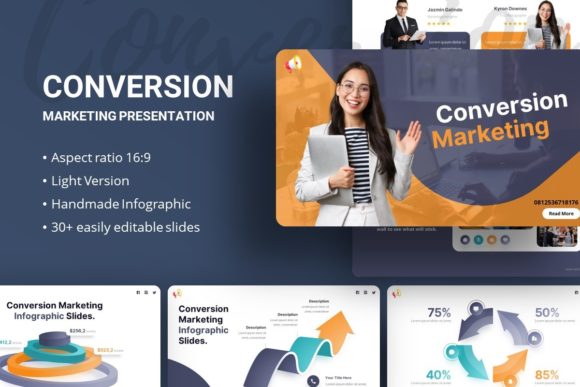
- 35 Slides for Each Template: With 35 fully designed slides, you have ample space to cover all aspects of your presentation, from introductions to detailed data analysis.
- Easy Customizable Contents: The template is built with flexibility in mind. You can easily customize each slide to fit your specific needs, ensuring that your presentation looks exactly as you envision.
- Handcrafted Infographics in PowerPoint: Visuals are key in any presentation, and this template includes handcrafted infographics that help you present complex information in an engaging and easy-to-understand format.
- Based on Master Slides: The use of master slides ensures consistency across your presentation, making it look professional and polished.
- Pixel-Perfect Illustrations: All graphics are meticulously crafted to be pixel-perfect, ensuring that your presentation looks sharp and clean, no matter the screen size.
- All Graphics Resizable and Editable: Every graphic element in the template is fully editable and resizable, allowing you to tailor the visuals to your specific requirements.
- Picture Placeholder, Drag & Drop: Adding images to your presentation has never been easier. Simply drag and drop your images into the placeholders, and they will automatically adjust to fit perfectly.
Who Can Benefit from the Presentation Template - Conversion?
The Presentation Template - Conversion is designed to cater to a wide range of users, including:
- Creative Agencies: Showcase your creative projects and services with visually appealing and well-organized presentations.
- Corporate and Business Presentations: Use this template to present business strategies, financial reports, and other corporate information in a clear and professional manner.
- Company Profiles: Create compelling company profiles that highlight your brand, mission, and achievements.
- Portfolio Presentations: Whether you are a designer, photographer, or any other creative professional, this template allows you to present your work in a way that truly stands out.
- Photography Presentations: Display your photographic works in a sleek and modern layout, perfect for showcasing your artistic vision.
- Pitch Decks: Craft persuasive pitch decks that can help you secure funding, partnerships, or new clients.
- Startups: As a startup, you need to make a strong first impression. This template helps you do just that with its professional and dynamic design.
- Personal Portfolio: Ideal for individuals looking to create a personal portfolio that reflects their skills, experiences, and accomplishments.
Why Choose the Presentation Template - Conversion?
Choosing the right presentation template is crucial for effectively communicating your message. Here are some compelling reasons to opt for the Presentation Template - Conversion:
- Versatility: The template’s versatility allows it to be used across various industries and purposes, making it a one-stop solution for all your presentation needs.
- User-Friendly: Even if you are not a design expert, the easy-to-use features and customizable elements make it simple to create a high-quality presentation.
- Professional Design: The clean, modern, and professional design of the template enhances the credibility and impact of your presentation.
- Comprehensive Documentation: The included documentation file provides detailed instructions and tips, helping you get the most out of the template.
- Vector Icons: A set of vector icons is included, which can be used to add visual interest and clarity to your slides.
Considerations and Tips for Using the Template
To make the most of the Presentation Template - Conversion, here are some considerations and tips:
- Plan Your Content: Before you start customizing the template, plan your content and structure. This will help you choose the right slides and ensure a smooth flow.
- Consistency is Key: Use the master slides to maintain a consistent look throughout your presentation. Consistency in design and style enhances professionalism.
- Use High-Quality Images: While the template provides placeholders, using high-quality images will significantly enhance the visual appeal of your presentation.
- Keep It Simple: Avoid overloading your slides with too much information. Keep your content concise and focused to keep your audience engaged.
- Practice Your Delivery: A great presentation is not just about the slides; it’s also about how you deliver the content. Practice your speech to ensure a smooth and impactful delivery.
In Conclusion
The Presentation Template - Conversion is a robust and flexible tool that can elevate your presentations to the next level. Whether you are a seasoned professional or a beginner, this template offers the tools and features you need to create impressive and effective presentations. By leveraging its versatility, user-friendly design, and professional features, you can make a lasting impression on your audience.
Hope you like it. Thanks!